Give chat a character to rally around
AI Twitch Emote MakerSmall emotes. Big personality.
Turn your channel’s character into a set of expressive emotes. Keep the same identity across your stream, then export the small PNG sizes you need for chat.
First style sheet covered by signup credits. Finished assets use credits.
Made with AlertForge
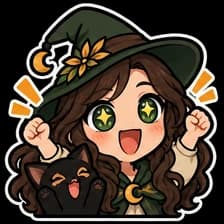
A character chat can recognize.
A selection from the finished Nightwillow emote set. Bold expressions and a clear silhouette help a character read at small sizes; inspect your own exports at 28 pixels, too.
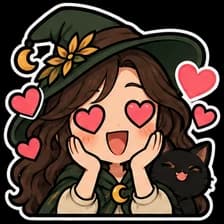
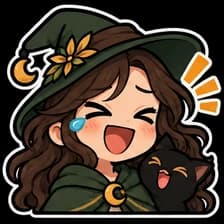
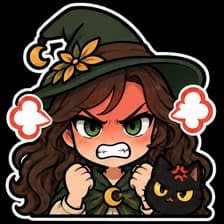
Eight matching expressions
Generate a coordinated emote set from the project’s approved style sheet, then review each face and pose.
Three export sizes
Download transparent PNGs at 112 × 112, 56 × 56, and 28 × 28 pixels for each emote.
Designed for your channel
Start from your own character or an authorized reference. Keep the emotes consistent with the rest of your stream artwork.
From your idea to your channel
- 01
Introduce your character
Start a stream pack project and describe your mascot, visual style, and colors. Approve the style sheet before generating the emotes.
- 02
Select emotes and review the set
Choose the emote set in the builder and confirm the credit cost. Inspect the expressions, transparent edges, and readability before export.
- 03
Upload the right sizes
Download your PNG exports and open your Twitch emote manager. Use the appropriate files for its upload mode. Availability, slots, and approval depend on your Twitch account and the platform’s guidelines.
Choose your assets.
See the cost first.
Start with your style sheet, then select what to generate. One-time credits and monthly plans share the same wallet. A credit purchase does not lock you into a fixed set of assets.
See current pricingBefore you start
What sizes does AlertForge export?
Each emote exports as transparent PNG files at 112 × 112, 56 × 56, and 28 × 28 pixels. Inspect all three sizes so details remain readable in chat.
Are these animated emotes?
This emote set exports static PNG images. It does not include animated GIF emotes.
Will Twitch approve every generated emote?
Approval is not guaranteed. You are responsible for having the rights to your character and checking the artwork against Twitch’s current emote guidelines and your account’s eligibility.
Can I make emotes without buying a complete pack?
Yes. Select the emote set after approving your style sheet. Generation uses credits, with the cost shown before confirmation. The free first style sheet preview is separate from the finished emote set.
Build the rest of your look.
Your approved style sheet can guide the next asset in the same project. Generate and review each piece as you need it.